Thinking Tag
Overview
The Thinking Tag is a tag that allows the assistant to think about the problem before answering.
This tag improves the assistant's ability to think about the problem and to provide a more accurate answer; can be used only once per message.
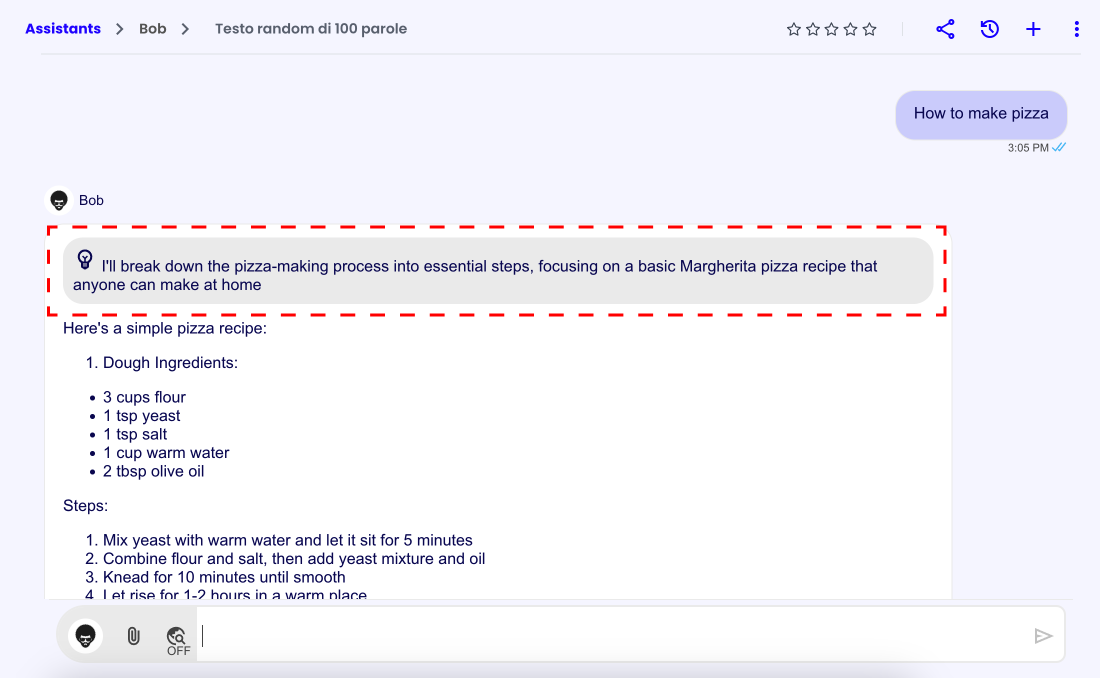
Tag Structure
<thinking>
Here goes the thinking text
</thinking>
Usage Example
To implement the Thinking Tag you could, for example, add the following instructions to the assistant's system prompt in the assistant's AI Settings:
## Advanced Reasoning
- Always, Briefly, Before providing an answer, think of a phrase in the <thinking> </thinking> tag that explains the reasoning to be applied to provide the best possible answer in accordance with the previous instructions and the information present in the context.
- You can use the <thinking> </thinking> tag only once in each response
This approach is similar to the Zero-Shot CoT technique: Chain of Thought.
To know more about the assistant's AI Settings, please refer to the AI Settings page.