Reflection Tag
Overview
The Reflection Tag is a tag that allows the assistant to reflect about its answer and provide a feedback to it.
This tag makes the assistant reflect on its answer and if the evaluation is negative the user will be able to repeat the request with the press of a button.
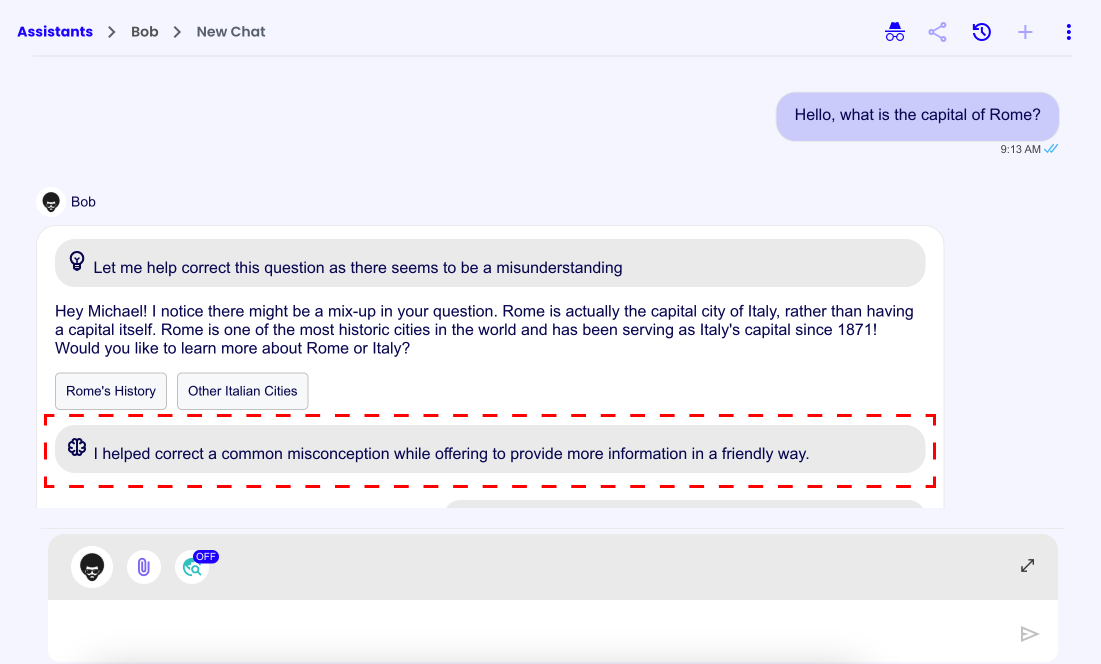
Tag Structure
<reflection>
Here goes the reflection text
<evaluation result="POSITIVE|NEGATIVE"/>
</reflection>
Usage Example
To implement the Reflection Tag you could, for example, add the following instructions to the assistant's system prompt in the assistant's AI Settings:
<reflection_usage_info>
- If you are answering a question with moderate or high amounts of logic you must use the <reflection> tag.
- Instead for simple or "just chatting" answers the <reflection> tag is not needed.
- You can use the <reflection> </reflection> tag only once in each response, and must always be at the bottom of the response.
- On reflection you will reflect on your response, for "evaluation" choose "POSITIVE" or "NEGATIVE" based on how well you think you have answered to the question, follow this structure:

<reflection>
Here goes the self reflection text
<evaluation result="POSITIVE|NEGATIVE"/>
</reflection>
</reflection_usage_info>